
Projects
A project is the namespaces that carry the same kubeglass.io/project label, such as a team’s shop-dev, shop-staging and shop-prod. Projects in the sidebar lists them, with how many errors and warnings each has.
Namespaces Headlamp put in a project (its headlamp.dev/project-id label) count too, so the projects you made in Headlamp show up as they are; the list marks them Headlamp. Where a namespace has both labels, kubeglass.io/project wins.
A project’s page
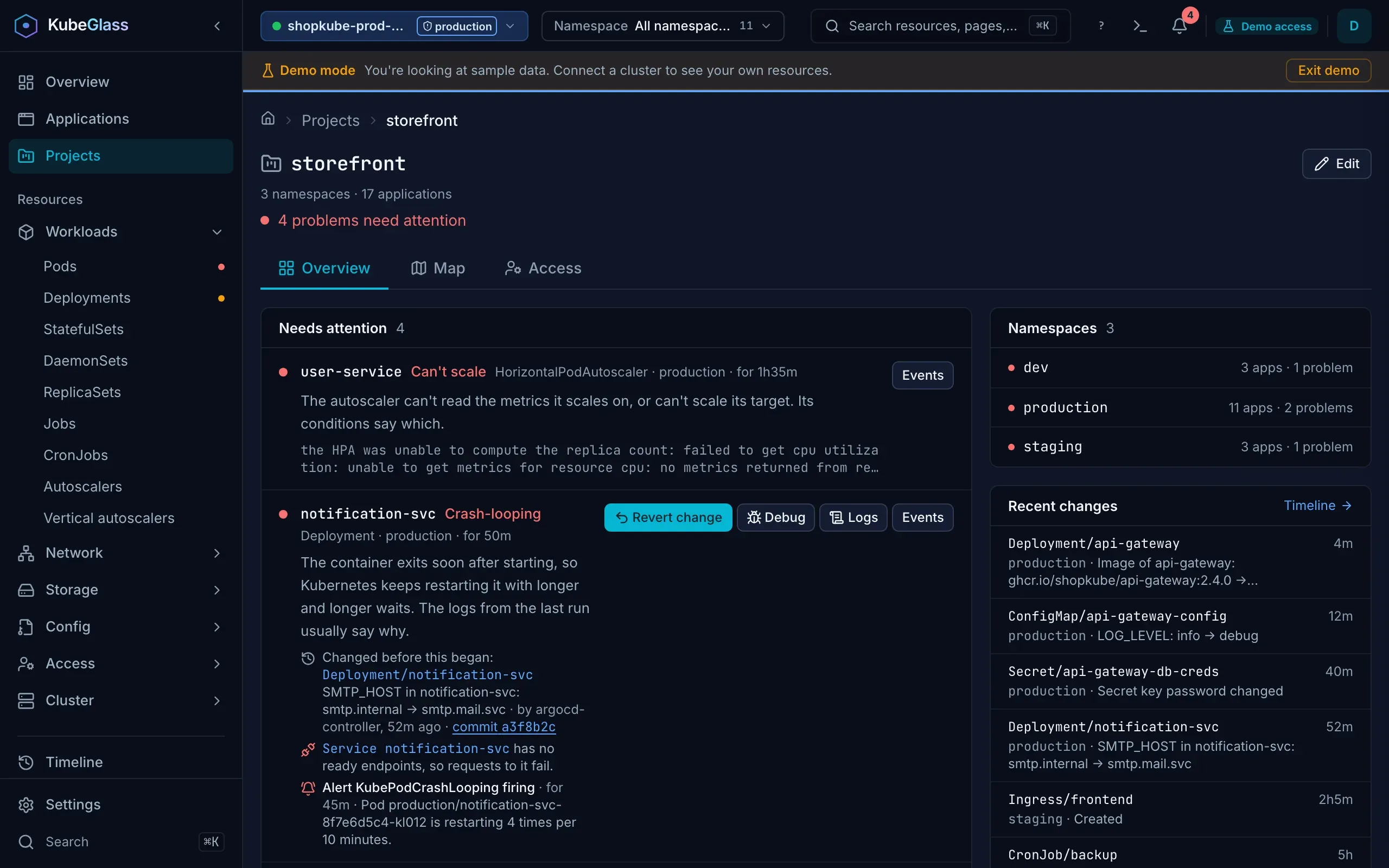
Section titled “A project’s page”/projects/<name> starts with how many namespaces and applications the project has and what needs attention, then:
- Overview: the problems in its namespaces, as on the Overview, with their fixes; its applications, worst first, where one from Argo CD, Flux or Helm in several of its namespaces is one row; each namespace with its applications and problems; and the changes KubeGlass recorded there.
- Map: the map of its namespaces, a lane each.
- Access: Security › Access in one of its namespaces, picked above it: what a user, group or service account may do there, who may do something, and a guided way to make a role or binding.
KubeGlass asks the API server about each of the project’s namespaces on its own, as you, so the page works for someone who may read only those namespaces.
With access to some namespaces only
Section titled “With access to some namespaces only”Finding projects takes reading the namespaces’ labels. If your user may not list namespaces, as with a kubeconfig made for one team, name the namespaces you work in under Settings › Clusters › Allowed namespaces. KubeGlass then reads each of them on its own and shows the projects they are in; a RoleBinding in a namespace, such as one to the built-in view ClusterRole, is enough to read that namespace. Projects and a project’s page say how many namespaces the projects come from and which of the named ones your user may not read, since a project may have namespaces you can’t see. A project none of them is in says so, rather than that it has no namespaces. Whoever may list namespaces sees every namespace of each project, with allowed namespaces set or not.
There you can add namespaces you may label to a project and take them out, but not rename or remove the project: KubeGlass can’t see its other namespaces, so it would leave them out. A namespace you create in a project is added to Allowed namespaces, so KubeGlass finds it.
Making and changing a project
Section titled “Making and changing a project”New project asks for a name and the namespaces that make it up: pick existing ones, and type new ones to create in it. A namespace that is in another project says which; picking it moves it. Review changes asks the API server with a dry run, as you, what each change would do: create the namespace, add the label, move it from another project or take it out, with each label’s value before and after. Nothing changes until you press Create project.
On a project’s page, Edit changes its namespaces, or its name, which relabels them all. Remove project takes every namespace out of it and leaves the namespaces as they are. A namespace Headlamp put in the project keeps Headlamp’s label in step, so both tools agree.
The labels are ordinary namespace labels, so kubectl label namespace shop-dev kubeglass.io/project=shop works too. Changing them takes get and patch on namespaces, and creating one takes create; Kubernetes RBAC decides. New project and Edit are turned off only when you may not create namespaces and may label none of the namespaces KubeGlass can see; pointing at one then says what is missing. KubeGlass asks about up to 100 namespaces, the allowed ones first, then the project’s, so on a cluster with more the buttons stay on and the dry run says what would fail. In the dialog, a namespace you may not label can’t be picked or taken out, and renaming or removing a project takes labelling all of its namespaces. A namespace that isn’t the project’s or an allowed one is checked when you tick it, and Review waits for the answer.